Match Lab
How to analyze a tennis match with a debrief, statistics and slow motion
A match leaves two records. One is in your head, and it is at its best in the hour after the last point. The other is on the video, and it does not change. Use both, in a fixed order, and compare them at the end.
One match, in the order you analyze it
- 01Write what you feltBefore any number or any frameWithin the hour
- 02Read the statisticsYour weak sides, then the opponent'sWhen the marks are there
- 03Watch the shots slowlyA highlight of one shot type, at 0.5x and 0.1x
- 04Check the debriefEach sentence against the countLast
What do you do right after the match?
Write down what you felt, before you see a number or a frame. Do it in the first hour, while the memory is fresh. Say how your serve, return, forehand, backhand, movement and net play went, and the same for the opponent. One sentence for each part is enough.
In Tencoline this is the Write step of the debrief. The page gives you the usual list of the parts of the game two times, under You and under The opponent. Each card asks one question, such as "How did your backhand play?"
Few people want to type on a phone after three sets. So each card has Speak. You talk, press Stop, and the words appear in the card, where you correct them like typed text. A voice note works in English and Russian. The recording is not kept, only the text.
You can write a debrief before the upload. Between two matches on one day there is no video yet, and you do not need one. You attach the video later. The debrief is free. Make an account, and after your next match open Debriefs and write the first entry.
The Write step shows no number, on purpose. A player who reads the count first starts to report the count, and then there is nothing left to compare.
Which statistics show a weak side?
The error rate of each shot type. The match summary lists every shot type with three numbers: the shots, the errors, and the errors as a percentage of the shots. Compare your forehand with your backhand first. Then look at where the errors went: into the net, wide, long, or on a change of direction. A weak side is a high rate on a large count.
Read the count before the percentage. Two errors from five backhands is 40 %, and it tells you almost nothing. Two errors from fifty is 4 %, and fifty shots is a count you can read.
Both lists, for the whole match
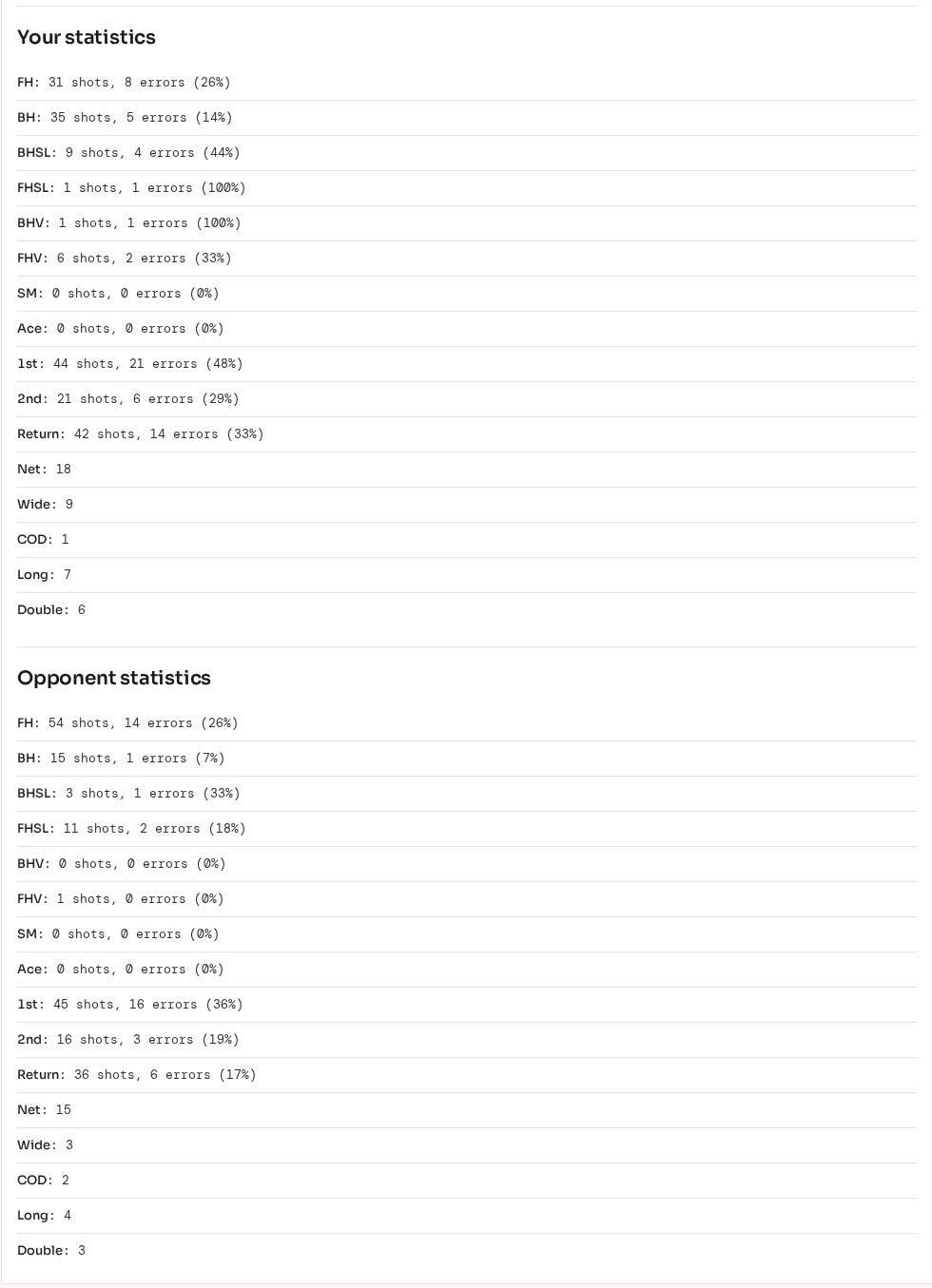
Three rows in the point statistics show when the weak side appears:
- Errors after 0–2, 3–6 and 7+ shots: errors in the first two shots are the serve and the return. Errors after seven shots come from the rally, such as the depth or the choice of shot.
- Win % by rally length: the same three bands, as points won. If you win the short points and lose the long ones, train the long rally.
- Points won in pressure situations: the share of break points, 30-30, deuce and tie-break points that you won.
Use the Set menu at the top of the match summary to read one set at a time. A backhand that breaks down only in the third set is a different problem from one that misses from the first game.
The match summary is in the Free plan. Upload a match, mark the shots by hand on the timeline, and the lists count your marks.
How do you find the opponent's weak side?
Read the same numbers for the opponent. Under your own list, the match summary has Opponent statistics with the same rows: the shots, the errors and the error rate for each shot type. The net, wide, long and change-of-direction errors show one count for you and one for the opponent. Where the opponent misses more, play more balls.
The list appears only when the opponent's shots have marks. A match marked for one player has no opponent list, so mark the shots of both players.
The numbers say where the opponent misses. To decide what to play there, use the Tactics step of the debrief. It turns each answer into a ladder: a first choice, and what to play when it fails. Three choices are ready to pick: attack first, change pace and spin, or play safe with height and depth. For example, against a backhand that misses long, the first choice is high topspin to the backhand, and when that fails, a slice to the same side.
How do you check a shot in slow motion?
Cut a highlight of one shot type, then watch each segment slowly. The highlight editor cuts three seconds around each mark: one second before it and two after. Open the highlight and press the speed button. It goes from 1x to 0.5x, then 0.1x, then 3x. At 0.1x, two Frame buttons move the video by 1/30 of a second.
The player at 0.1x
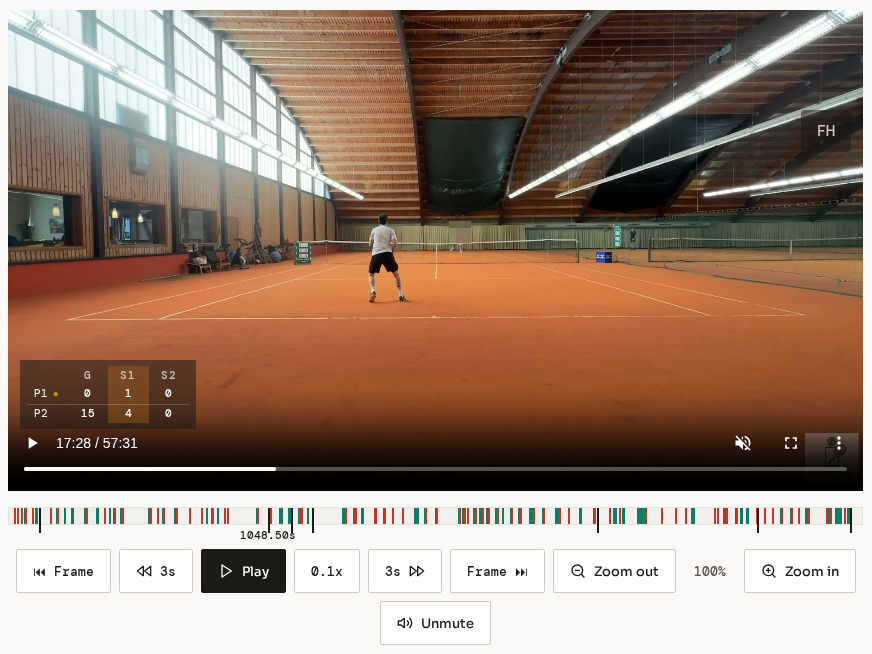
Watch the highlight rather than the full match, because in the highlight the backhands follow one after the other. You see the same stroke many times in a row, and a difference between two of them is easier to see.
Watch one moment of the shot on each pass through the highlight. A shot has four moments to check, always in the same order.
Four moments of one shot
- 01PreparationIs the racket back and the body turned before the bounce?0.5x
- 02ContactIs the contact in front of the body, at a comfortable height?0.1x, frame by frame
- 03BalanceIs the head still at contact, and the weight going forward?0.5x
- 04RecoveryDoes the player get back to position before the opponent hits?1x
Two more controls help here. Zoom in goes up to 500 %, in steps of 10 %, which helps with the far player on a phone video. You can also draw on the video, for example a line along the swing, so that the coach sees what you saw. A highlight has its own share link.
The player turns the sound off at every speed other than 1x. To hear the contact, go back to 1x.
What can slow motion not show?
It cannot show a frame the camera did not record. A normal phone video has 30 or 60 frames a second. At 30, a ball at 100 km/h moves about 93 cm from one frame to the next. So the exact moment of contact is often not in the video. The frame you see is the closest one before or after it.
Record at 60 frames a second if your phone can. The distance between two frames is then about 46 cm. The video player has one limit here. The Frame buttons always move 1/30 of a second, so on a 60-frame video each press moves two frames.
The camera position decides what you can check. A camera behind one baseline shows the near player well and the far player small. Check the preparation and the recovery of the far player, and do not trust their contact.
Slow motion shows that the contact was late. It does not show the cause, which can be the opponent's pace, your first step, or your grip. Compare it with what you felt in the debrief.
Was what you felt what happened?
The Check step of the debrief answers that. It puts each sentence you wrote next to the count from the marks, and gives one verdict: Confirmed, Partly, Not confirmed, Too few points, or No mark yet. You choose the range: the first two games, one set, or the full match. The words you wrote do not change.
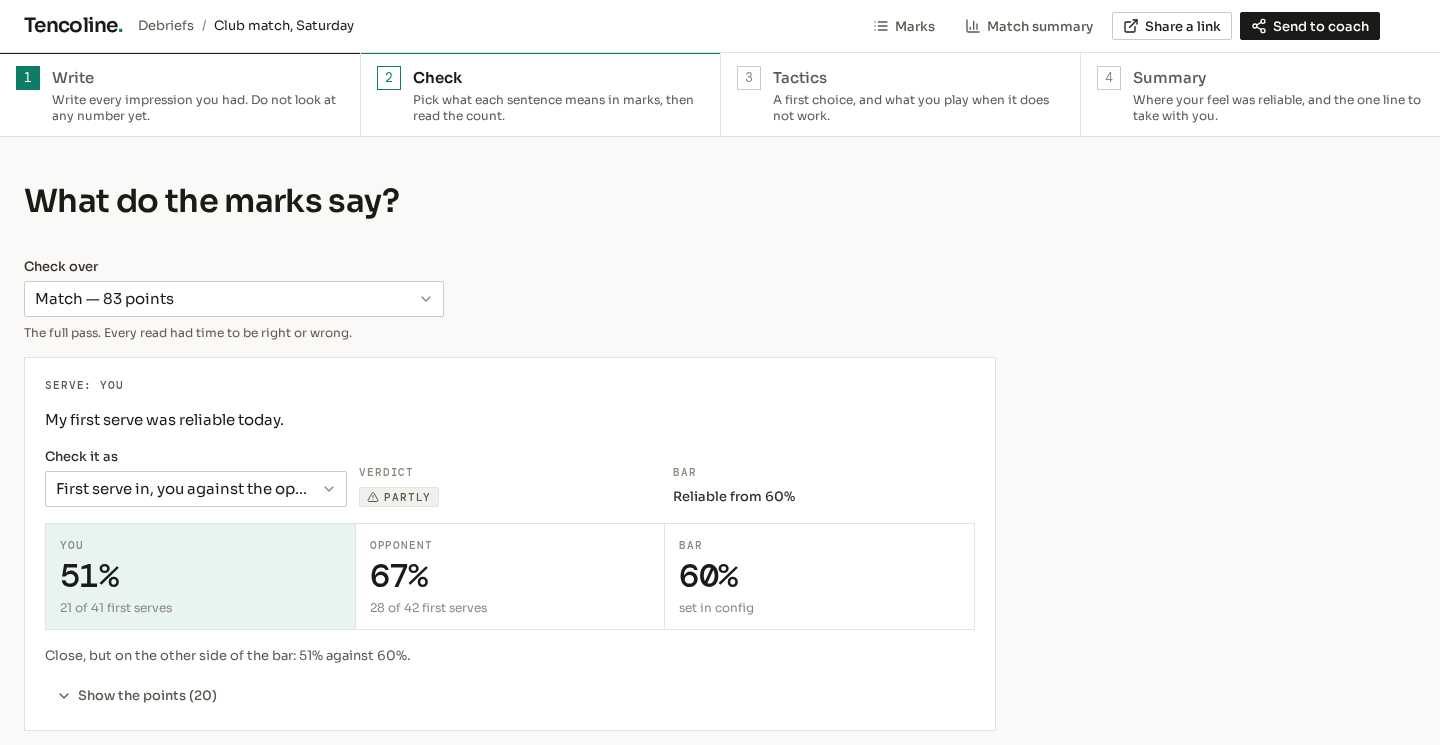
For each sentence you pick a measure, and each measure has a bar that the page prints beside the result. For "My first serve was reliable", pick First serve in. Reliable starts at 60 %. A result on the other side of the bar, but within 10 points of it, is Partly. Further away, it is Not confirmed.
One sentence, checked over the match
The debrief measures pace as time. For "He plays fast and I am always late", the measure is the time you had on the opponent's balls: the gap from the opponent's shot to your next shot, against the same gap the other way. A gap under 0.9 seconds counts as a fast ball. A gap over 4 seconds is a missing mark, not a slow ball, so the page leaves it out and says how many it left out.
What you felt, against what the marks say
The two corners on the right are the reason to write first. A feel comes from the few points you remember, and a count includes every point. When they disagree, the count can be wrong too, because one missing mark changes it. Either way, watch those points again.
The Summary step then shows where your feel was reliable, theme by theme, and one line to take into the next match. Share a link gives you an address to send to your coach on the same day, before the upload is done.
What does this analysis not do?
It does not count what nobody marked. Every number comes from the marks, so a match with no marks has no statistics, and one missing mark changes a count. Some sentences have no mark at all. "I hit it off the frame" gets the verdict No mark yet. A sentence with too few points behind it gets Too few points.
Marking by hand is slow. A full match has hundreds of shots. The Free plan has everything in this article: the match summary, the highlight editor, slow motion, drawing and the debrief. If you have no time to mark a match, TencolineAI writes the marks, and you approve the list instead of making it. That is the Premium plan, and the pricing page has the price.
It also does not choose what you train. The numbers show where the errors are. Which one to fix first is a decision for you and your coach.
What to do next
The first four steps are free. The fifth is for a player who has no time to mark.
- Make a free account. It needs no card.
- Within an hour of your next match, open Debriefs and write one sentence for each part of the game, for you and for the opponent. You do not have to wait for the upload.
- Upload the match and mark the shots by hand. Then open the match summary and read the error rate of each shot type, the count first.
- Attach the video to the debrief and open the Check step. Read which of your sentences the marks confirm, then cut a highlight of your weakest shot type and watch the contact at 0.1x.
- If you have no time to mark a full match, take Premium. TencolineAI marks the match, and you approve the list.