Match Lab
How to make a tennis highlight video from a full match
A ninety-minute match holds about four minutes that you want to watch again. The work is to find them. Cutting them is fast, and it has been fast for years. Most of the time goes into the finding, and you can give that part away.
What do you need before you can cut a highlight?
You need marks. A mark is one shot with a time and a type, such as a forehand at 12:41. The highlight editor in Tencoline does not look at the picture. It reads the list of marks and cuts a short segment around each one. A match with no marks gives one long segment, and you cut it by hand.
There are two ways to get marks. You press a button for each shot while you watch the match, or TencolineAI watches the match and writes the list. The first way is in the Free plan and costs your time. The second way is what Premium sells.
How long is a highlight made from marks?
Three seconds for each mark, and six for each serve. A segment starts one second before the mark and stops two seconds after it. A serve starts three seconds earlier, because the toss is part of the shot. These numbers are the rule the editor cuts with, so you can count before you cut.
Eighty forehands give 80 × 3 s, which is four minutes. Two marks that are near each other give one longer segment, so the real highlight is a little shorter than the sum. The editor does this count for you. Before you press Generate it says, for example, "Cuts 80 segments of FH · 4:00.00 from 1 video".
The four steps, left to right on one screen
- 01VideosThe open match, and any other match you addStep 1
- 02Cut from marksPick the shot types or a rally length, read the count, generateStep 2
- 03ReviewPlay the preview, then delete, trim or split a segmentStep 3
- 04Create highlightThe highlight is made and listed under each matchStep 4
How do you choose what goes into the highlight?
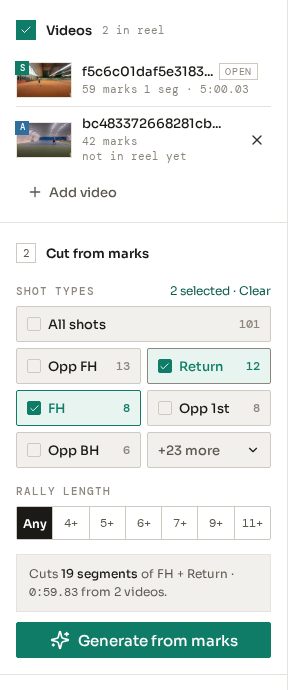
You pick shot types, or you pick a rally length. Each shot type shows how many marks it has, so you see, for example, 93 forehands and 6 smashes before you choose. You can pick more than one type. A rally length gives whole points instead, from the serve to the last shot.
The two choices do different jobs. Shot types answer "show me every backhand". A coach uses that to look at one stroke. Rally length answers "show me the long points", and a player uses that to see how a point was built. A rally segment keeps all shots of the point, so the shot types switch off while a rally length is on.
Step 2, before the cut
Can one highlight use more than one match?
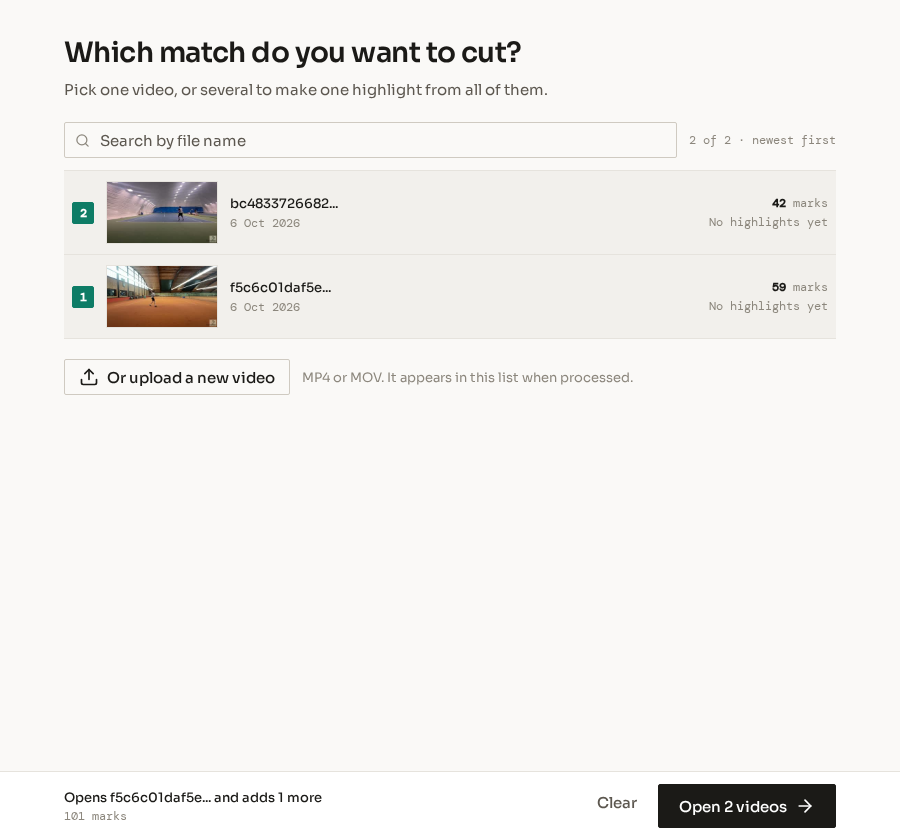
Yes. One highlight takes segments from as many as ten matches. You add a match from a list that shows a frame of each video, and the counts on the shot types then include its marks. Each match has a letter and a colour on the timeline, so you see which match a segment comes from.
This is the reason to keep marks on old matches. The forehands of five Saturdays in one file show a change that no single match shows. When the highlight is made, it is listed under each of the matches it has segments from.
Two matches, picked in order
What do you still do by hand?
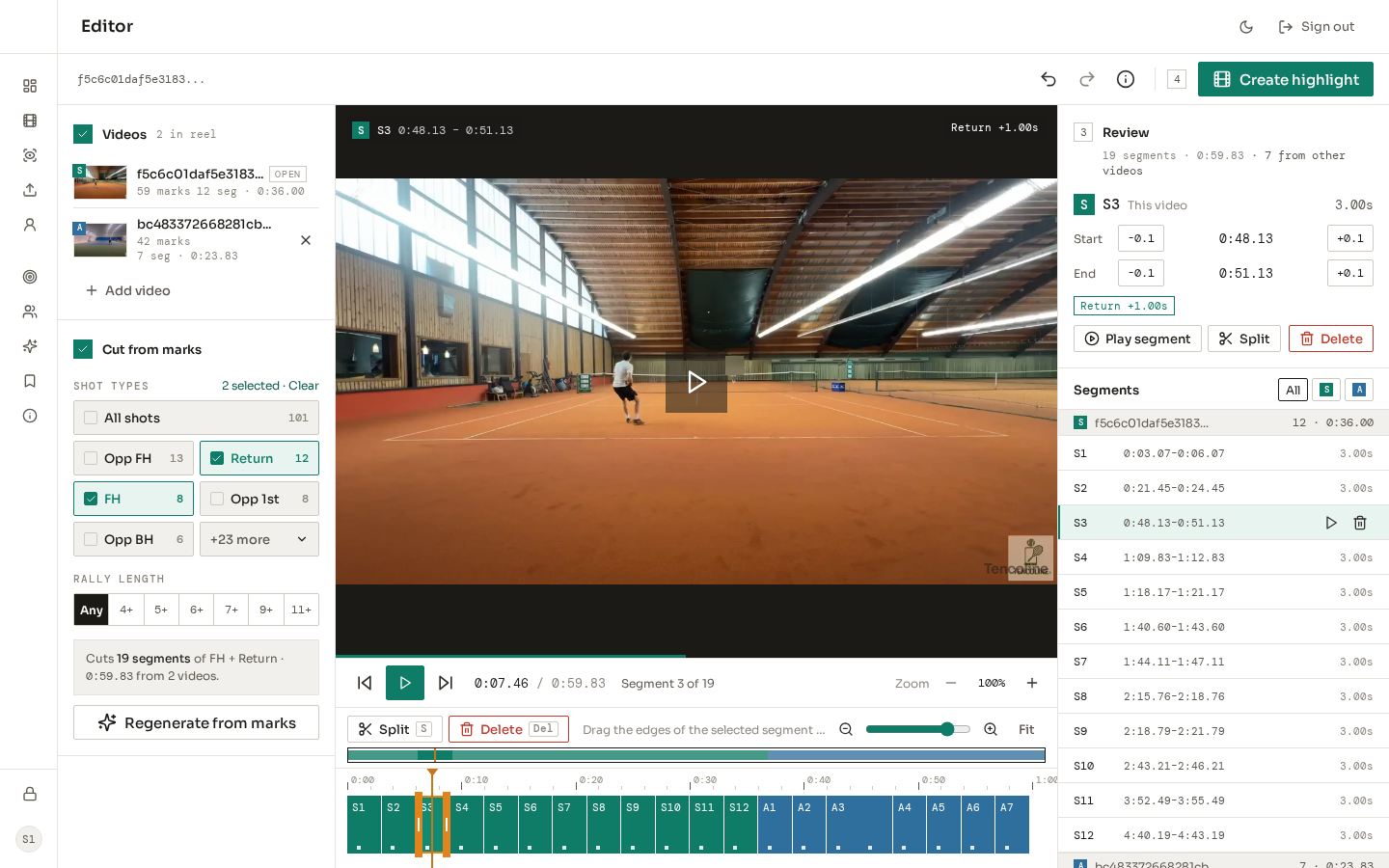
You review. The cut is a rule, and a rule does not know which forehand was good. You play the preview and delete the segments you do not want. You move the start or the end of a segment in steps of 0.1 seconds, or you pull its edge on the timeline. You split one segment in two.
The preview plays the segments of all matches as one video, so what you see is what you get. Each edit can be undone. A new cut asks before it replaces the edits you made, because those edits were the slow part.
Step 3, the review
What does Premium add to a highlight?
Premium adds the marks. The highlight editor is in the Free plan, and so is marking by hand. With Premium, TencolineAI marks four matches a month for you. Then the list of shots is there when you open the editor, and you start with the cut. The pricing page has the price.
With the Free plan you can make every highlight that this article describes. You mark each shot yourself first, and a full match has hundreds of shots. A free account also gets one test of TencolineAI on the first five minutes of a match.
TencolineAI makes mistakes. It misses some shots and gives some the wrong type. For a highlight this costs less than for statistics. A missed forehand is one segment less, and a wrong one is a segment you delete in the review.
What does the editor not do?
It does not choose the best shots, add music, add titles or put an effect between two segments. It cuts and joins. It also does not download a file to your computer. The highlight is made on the server, plays in Tencoline, and you share it with a link.
If you want a film with a soundtrack, make the highlight here and finish it in a video program. If you want to show a player eleven backhands before the next lesson, the cut is all you need.
What to do next
- Open a match that has marks and pick one shot type.
- Read the count, then generate and play the preview one time.
- Delete what you do not want and press Create highlight.
- If the match has no marks, mark one set by hand and see how long it takes. That time is what Premium saves.